OpenJDK 소스 직접 빌드해보기
OpenJDK 소스 구조 분석 및 컴파일 과정에서 마주친 빌드 이슈와 JVM 내부 모듈의 역할 정리
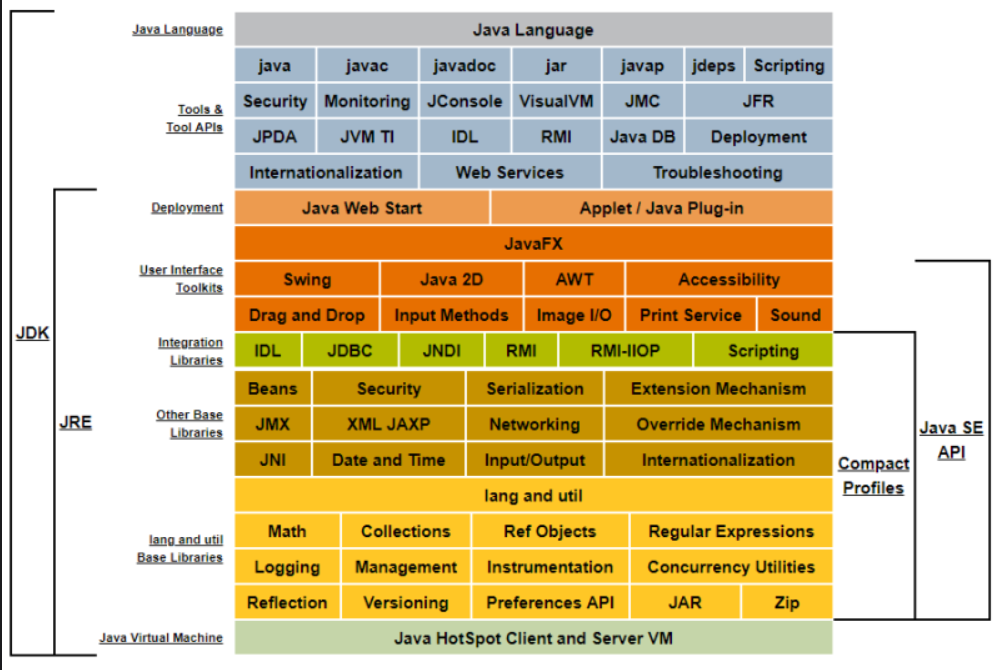
뭘 하는가
해당 레포지토리에서 클론하던지 다운로드 하여 jdk를 로컬에서 빌드한 후, 내부 구조를 디버깅해보기
목적, JDK 구조
목적은 JDK 내부 구조를 살펴보고 싶어서이다. 더 구체적인 목표에 맞춰서 살펴봐야 좋을 거 같은데, 미리 정리해두고 하나씩 살펴보려고 한다.
1. javac, APT의 동작 원리
- `src/jdk.compiler/share/classes/com/sun/tools/javac/processing`
  - `JavacProcessingEnvironment.java` : APT가 실행되는 전체 환경을 관리하는 클래스, 어노테이션 프로세서(Processor)를 로드하고 실행하는 역할
  - `JavacRoundEnvironment.java` : 각 컴파일 라운드(round)에 대한 정보를 제공하는 클래스
  - `Messager.java` : 어노테이션 프로세서가 컴파일러에 메시지(경고, 오류 등)를 보낼 때 사용하는 인터페이스
  - `Filer.java` : 어노테이션 프로세서가 새로운 소스 파일이나 리소스 파일을 생성할 때 사용하는 인터페이스
- `src/jdk.compiler/share/classes/com/sun/tools/javac/api` : javac 컴파일러를 프로그래밍 방식으로 호출하는 데 사용되는 API들
  - JavacTool.java : 컴파일러의 진입점, APT 설정도 여기서
- `src/jdk.compiler/share/classes/com/sun/tools/javac/main` : 컴파일러의 메인 로직
  - `JavaCompiler.java` : AST(Abstract Syntax Tree) 생성, 타입 체크, 코드 생성 등 컴파일의 모든 단계가 이 클래스의 메서드들을 통해 실행된다.
- APT는
JavacProcessingEnvironment→Processor→Filer등을 통해 작동한다.
2. GC 모듈화, 커스텀 GC, G1, ZGC, Shenandoah
-`src/hotspot/share/gc/`
    - `g1`, `z`, `shenandoah`, `parallel`, `serial` → 각각 GC 구현
    - `shared` → GC 인터페이스 및 공통 로직 (`gcInterface`, `collectedHeap.*` 등)
CollectedHeap이 모든 GC의 추상 인터페이스G1CollectedHeap,ZHeap등의 하위 클래스가 실제 구현이다.- JDK 10 이후 GC 인터페이스 구조가 정리되었고, 플러그인처럼 GC를 교체할 수 있음
- 원한다면 구현해서 넣어놓고 커스텀 GC 개발도 이론상 가능
3. 클래스로더, CDS 구조 이해
-`src/java.base/share/classes/java/lang/ClassLoader.java`
-`src/hotspot/share/classfile/`
    - `classLoader.*` → 클래스 로딩 과정의 네이티브 처리
    - `systemDictionary.cpp` → JVM이 클래스 로딩/캐시하는 핵심
    - `classFileParser.*` → `.class` 파일 분석기
- Java 레벨:
defineClass,findClass,ClassLoader상속 전략 - JVM 내부:
SystemDictionary는 전역 클래스 테이블 - CDS는 클래스 메타데이터를 미리 dump하여 빠르게 로딩
4. JIT 컴파일러, C1, C2, Graal, JVMCI 구조 분석
-`src/hotspot/share/compiler/`
    - `compilerDefinitions.cpp`, `compilerDirectives.*`
-`src/hotspot/share/opto/` → C2 최적화 컴파일러
-`src/hotspot/share/c1/` → C1 컴파일러
-`src/jdk.internal.vm.compiler` → Graal 컴파일러
-`src/jdk.internal.vm.ci` → JVMCI: 외부 컴파일러(Graal 등)를 JVM과 연결
AbstractCompiler→ C1, C2, Graal의 공통 인터페이스이다.CompileBroker→ 컴파일 요청 처리- JVMCI는 Java로 작성된 컴파일러(Graal 등)를 JVM에 연결하는 다리 역할
5. AOT 컴파일 & Substrate VM (GraalVM)
서브스트레이트 VM 은 GraalVM의 한 요소이다. 사전 컴파일된 네이티브 코드를 핫스팟 가상 머신 없이 실행하는 기술임. 독자적인 예외 처리, 스레드 및 메모리 관리, 자바 네이티브 인터페이스 접근 메커니즘을 갖췄다. 이로 인해 VM의 메모리 사용량과 시작 속도도 굉장히 내려갔음..
이 부분을 보려면 GraalVM 의 저장소를 직접 보는게 좋을 것 같다.
https://github.com/oracle/graal↗ 특히 substratevm, compiler, sdk 디렉터리 위주로
- Graal은 Truffle (동적 언어 실행 프레임워크)도 지원
- Substrate VM은 예외처리, GC, 클래스 로딩 등 독자 구현
native-image도구가 어떻게 Graal로 코드를 AOT 컴파일하는지 추적
6. Project Loom: 가상 스레드
개인적으론 JVM이 가상 스레드를 어떻게 스케줄링하는지가 궁금하긴 함.
-`src/java.base/share/classes/java/lang/VirtualThread.java`
- `src/java.base/share/classes/jdk/internal/vm/Continuation.java`
-`src/hotspot/share/runtime/continuation.*`
Continuation은 가상 스레드의 스택 상태를 저장/복원하는 핵심 구조VirtualThread는Thread를 상속하고 JVM에서 특별하게 처리FiberScheduler와 스케줄링 전략은 JVM의osThread.cpp,thread.cpp쪽에도 존재하는듯??
7. 추가 참고 자료
HotSpot의 구조를 공식적으로 요약 https://wiki.openjdk.org/display/HotSpot↗
GraalVM 공식문서 https://www.graalvm.org/latest/introduction/↗
Loom 프로젝트 공식 위키 https://wiki.openjdk.org/display/loom/Main↗
JDK 빌드하기
환경
- macOS (M4 칩)
- Xcode 16.4
- JDK 21을 빌드
- 로컬 JDK 21
참고로 17-35는 MacOS에서 빌드가 어려운 공식 이슈있음
error: invalid integral value '16-DMAC_OS_X_VERSION_MIN_REQUIRED=110000' in '-mstack-alignment=16-DMAC_OS_X_VERSION_MIN_REQUIRED=110000'
https://bugs.openjdk.org/browse/JDK-8272700↗ https://github.com/openjdk/jdk/commit/d007be0952abdc8beb7b68ebf7529a939162307b↗
해당 플래그 처리가 붙어서 되어버리는 현상
과정
1. OpenJdk 소스코드 받기
git clone https://github.com/openjdk/jdk.git
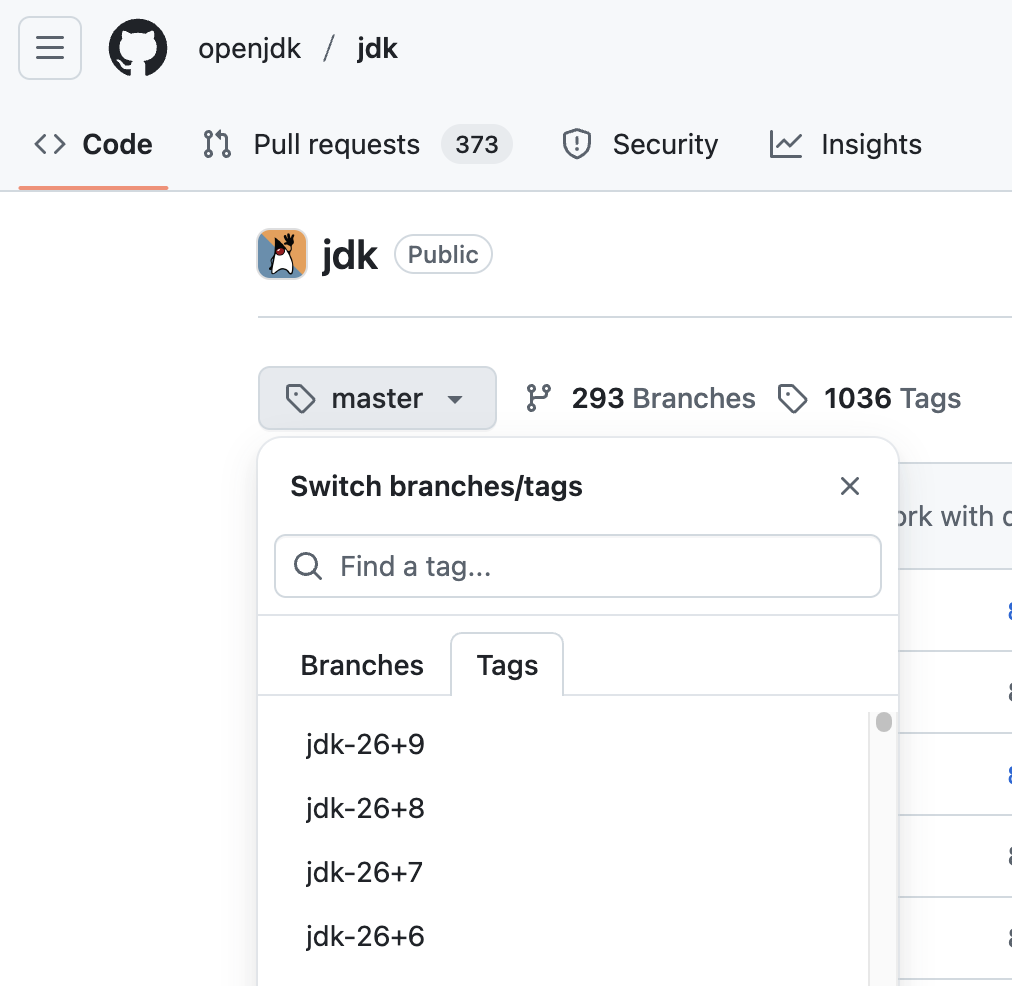 버전이 명시하려면 git checkout jdk-17+35 와 같이 태그나 브랜치를 체크아웃
아니면 해당 태그로 찾아서 직접 다운로드
버전이 명시하려면 git checkout jdk-17+35 와 같이 태그나 브랜치를 체크아웃
아니면 해당 태그로 찾아서 직접 다운로드
2. macOS 기준으로 Homebrew 설치
brew install autoconf
xcode-select --install
3. Configure
bash configure
하면 되어야 정상인데, 안되는 경우
- Xcode 설치 안됨 → xcode-select --install
- freetype 없음 → brew install freetype
- pkg-config 없음 → brew install pkg-config
- xcode-select가 SDK 경로를 제대로 못 찾을 때 아래 옵션 추가
- bash configure --with-sysroot=$(xcrun --sdk macosx --show-sdk-path)
configure: error: XCode tool 'metal' neither found in path nor with xcrun
metal이라는 Xcode 툴체인이 PATH에도 없고, xcrun으로도 찾을 수 없다는 에러
sudo xcode-select -s /Applications/Xcode.app/Contents/Developer
위 커맨드로 입력한 후 다시 ㄱㄱ
4. build
make
하면 됨
xattr: [Errno 13] Permission denied: '/Users/mac/Documents/jdk-jdk-17-35/build/.../jmxremote.password.template'
권한 없는 경우 전부 권한 처리 해주면 되는데,
sudo chmod -R u+w /Users/mac/Developer/jdk-jdk-21-35
저는 귀찮아서 sudo make 했습니다..
- zlib 관련 네이티브 코드(libzip/zutil.c)에서 발생한 매크로 충돌 및 시스템 헤더 재정의 문제
=== Output from failing command(s) repeated here ===
* For target support_native_java.base_libzip_zutil.o:
In file included from /Users/mac/Developer/jdk/src/java.base/share/native/libzip/zlib/zutil.c:32:
/Users/mac/Developer/jdk/src/java.base/share/native/libzip/zlib/zutil.h:194:11: warning: 'OS_CODE' macro redefined [-Wmacro-redefined]
  194 | #  define OS_CODE 19
      |           ^
/Users/mac/Developer/jdk/src/java.base/share/native/libzip/zlib/zutil.h:165:11: note: previous definition is here
  165 | #  define OS_CODE  7
      |           ^
In file included from /Users/mac/Developer/jdk/src/java.base/share/native/libzip/zlib/zutil.c:34:
In file included from /Users/mac/Developer/jdk/src/java.base/share/native/libzip/zlib/gzguts.h:45:
In file included from /Applications/Xcode.app/Contents/Developer/Platforms/MacOSX.platform/Developer/SDKs/MacOSX15.5.sdk/usr/include/stdio.h:61:
/Applications/Xcode.app/Contents/Developer/Platforms/MacOSX.platform/Developer/SDKs/MacOSX15.5.sdk/usr/include/_stdio.h:318:7: error: expected identifier or '('
  318 | FILE    *fdopen(int, const char *) __DARWIN_ALIAS_STARTING(__MAC_10_6, __IPHONE_2_0, __DARWIN_ALIAS(fdopen));
      |          ^
/Users/mac/Developer/jdk/src/java.base/share/native/libzip/zlib/zutil.h:171:33: note: expanded from macro 'fdopen'
  171 | #        define fdopen(fd,mode) NULL /* No fdopen() */
   ... (rest of output omitted)

* All command lines available in /Users/mac/Developer/jdk/build/macosx-aarch64-server-release/make-support/failure-logs.
=== End of repeated output ===
fdopen이라는 표준 시스템 함수가 zlib 내부 매크로로 재정의되었는데, 이것이 macOS SDK의 stdio.h 안의 진짜 fdopen() 함수와 충돌해서 컴파일이 깨진 상황임..
해결 시스템 헤더보다 zlib 헤더가 먼저 포함되도록 #undef fdopen을 넣는 커스텀 패치 -> 직접 소스코드 일부 수정
수정 대상
src/java.base/share/native/libzip/zlib/zutil.h
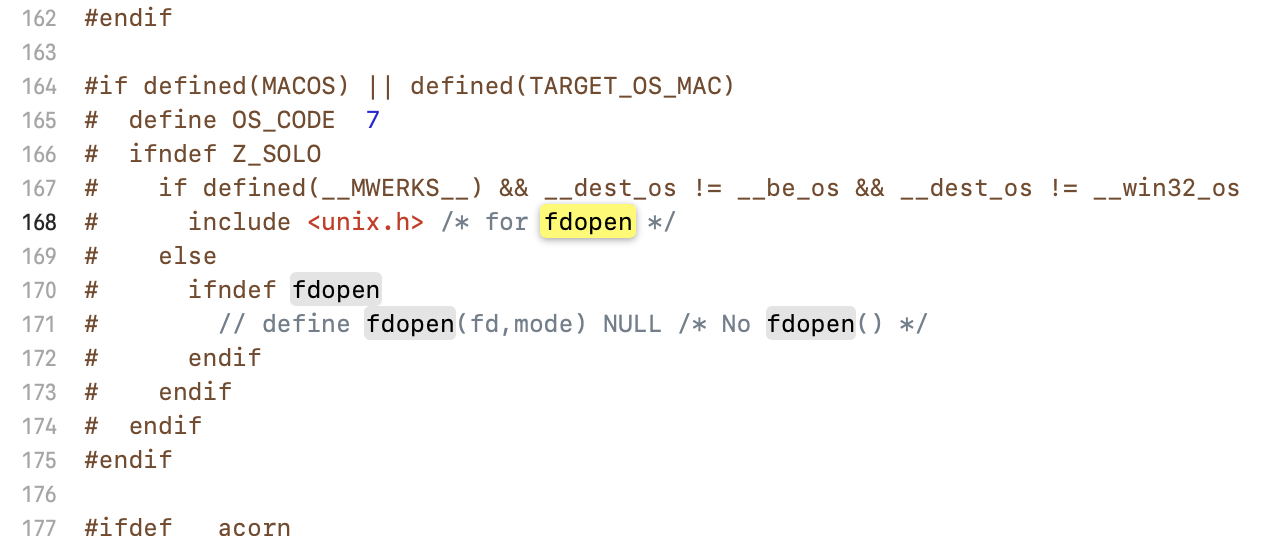
define fdopen(fd, mode) NULL 부분 전체 주석처리
- libpng 라이브러리 컴파일 과정에서 헤더 파일이 누락
=== Output from failing command(s) repeated here ===

* For target support_native_java.desktop_libsplashscreen_png.o:

In file included from /Users/mac/Developer/jdk/src/java.desktop/share/native/libsplashscreen/libpng/png.c:42:

/Users/mac/Developer/jdk/src/java.desktop/share/native/libsplashscreen/libpng/pngpriv.h:552:16: fatal error: 'fp.h' file not found

  552 | #      include <fp.h>

      |                ^~~~~~

1 error generated.

* For target support_native_java.desktop_libsplashscreen_pngerror.o:

In file included from /Users/mac/Developer/jdk/src/java.desktop/share/native/libsplashscreen/libpng/pngerror.c:47:

/Users/mac/Developer/jdk/src/java.desktop/share/native/libsplashscreen/libpng/pngpriv.h:552:16: fatal error: 'fp.h' file not found

  552 | #      include <fp.h>

      |                ^~~~~~

1 error generated.

* For target support_native_java.desktop_libsplashscreen_pngget.o:

In file included from /Users/mac/Developer/jdk/src/java.desktop/share/native/libsplashscreen/libpng/pngget.c:43:

/Users/mac/Developer/jdk/src/java.desktop/share/native/libsplashscreen/libpng/pngpriv.h:552:16: fatal error: 'fp.h' file not found

  552 | #      include <fp.h>

      |                ^~~~~~

1 error generated.

* For target support_native_java.desktop_libsplashscreen_pngmem.o:

In file included from /Users/mac/Developer/jdk/src/java.desktop/share/native/libsplashscreen/libpng/pngmem.c:48:

/Users/mac/Developer/jdk/src/java.desktop/share/native/libsplashscreen/libpng/pngpriv.h:552:16: fatal error: 'fp.h' file not found

  552 | #      include <fp.h>

      |                ^~~~~~

1 error generated.


* All command lines available in /Users/mac/Developer/jdk/build/macosx-aarch64-server-release/make-support/failure-logs.

=== End of repeated output ===
fp.h는 오래된 Mac OS 또는 특정 컴파일러 환경에서 사용되던 부동소수점 관련 헤더 파일이라고 한다... 최신 macOS 및 Xcode 환경에서는 더 이상 사용되지 않거나 다른 이름으로 대체되었다. OpenJDK의 libpng 코드는 이 헤더가 존재한다고 가정하고 컴파일을 시도하지만, 실제 시스템에는 없기 때문에 오류가 발생하는 것
해결
fp.h 헤더를 포함하는 코드를 비활성화 시키기
수정 대상
src/java.desktop/share/native/libsplashscreen/libpng/pngpriv.h
# include <fp.h> 부분을 찾아서, 로그에 따르면 552번째 줄 근처..
해당 부분을 주석처리 하기
- libpng 라이브러리 컴파일 과정에서 함수 누락
=== Output from failing command(s) repeated here ===

* For target support_native_java.desktop_libsplashscreen_png.o:

/Users/mac/Developer/jdk/src/java.desktop/share/native/libsplashscreen/libpng/png.c:2970:16: error: call to undeclared library function 'frexp' with type 'double (double, int *)'; ISO C99 and later do not support implicit function declarations [-Wimplicit-function-declaration]

 2970 |          (void)frexp(fp, &exp_b10); /* exponent to base 2 */

      |                ^

/Users/mac/Developer/jdk/src/java.desktop/share/native/libsplashscreen/libpng/png.c:2970:16: note: include the header <math.h> or explicitly provide a declaration for 'frexp'

/Users/mac/Developer/jdk/src/java.desktop/share/native/libsplashscreen/libpng/png.c:3042:24: error: call to undeclared library function 'modf' with type 'double (double, double *)'; ISO C99 and later do not support implicit function declarations [-Wimplicit-function-declaration]

 3042 |                   fp = modf(fp, &d);

      |                        ^

/Users/mac/Developer/jdk/src/java.desktop/share/native/libsplashscreen/libpng/png.c:3042:24: note: include the header <math.h> or explicitly provide a declaration for 'modf'

/Users/mac/Developer/jdk/src/java.desktop/share/native/libsplashscreen/libpng/png.c:3046:23: error: call to undeclared library function 'floor' with type 'double (double)'; ISO C99 and later do not support implicit function declarations [-Wimplicit-function-declaration]

 3046 |                   d = floor(fp + .5);

      |                       ^

/Users/mac/Developer/jdk/src/java.desktop/share/native/libsplashscreen/libpng/png.c:3046:23: note: include the header <math.h> or explicitly provide a declaration for 'floor'

/Users/mac/Developer/jdk/src/java.desktop/share/native/libsplashscreen/libpng/png.c:3921:31: error: call to undeclared library function 'pow' with type 'double (double, double)'; ISO C99 and later do not support implicit function declarations [-Wimplicit-function-declaration]

 3921 |          double r = floor(255*pow((int)/*SAFE*/value/255.,gamma_val*.00001)+.5);

      |                               ^

   ... (rest of output omitted)

* For target support_native_java.desktop_libsplashscreen_pngrtran.o:

/Users/mac/Developer/jdk/src/java.desktop/share/native/libsplashscreen/libpng/pngrtran.c:303:19: error: call to undeclared library function 'floor' with type 'double (double)'; ISO C99 and later do not support implicit function declarations [-Wimplicit-function-declaration]

  303 |    output_gamma = floor(output_gamma + .5);

      |                   ^

/Users/mac/Developer/jdk/src/java.desktop/share/native/libsplashscreen/libpng/pngrtran.c:303:19: note: include the header <math.h> or explicitly provide a declaration for 'floor'

1 error generated.


* All command lines available in /Users/mac/Developer/jdk/build/macosx-aarch64-server-release/make-support/failure-logs.

=== End of repeated output ===
frexp, modf, floor, pow와 같은 함수들은 <math.h> 헤더 파일에 정의되어 있음. 근데, C99 표준 이후부터는 헤더 파일에 선언되지 않은 함수를 호출하면 컴파일 오류 발생함. libpng 소스 코드의 일부 파일들이 이 함수들을 사용하면서도 <math.h>를 포함하지 않았기 때문에 오류가 발생한 것이다.
해결
해당 파일에 가서 #include <math.h> 해주기
수정 대상
src/java.desktop/share/native/libsplashscreen/libpng/png.c
src/java.desktop/share/native/libsplashscreen/libpng/pngrtran.c
#include "pngpriv.h"
#include <math.h>
이런식으로 추가해주면 된다.
여기까지 하고 나서 make 성공
Compiling up to 4 files for BUILD_JIGSAW_TOOLS

Optimizing the exploded image

Stopping javac server

Finished building target 'default (exploded-image)' in configuration 'macosx-aarch64-server-release'
이런 로그가 나오면 컴파일이 된 것이다.
앞으로 직접 디버깅 해가며 깨달은게 있다면, 추후 프로젝트에도 반영해보고 글로 남겨도 좋을 것 같다.